A matter device not pairing in Home Assistant is usually a short list of causes, and the project’s own Matter page names most of them. We read that page on 20 November 2026 and turned its troubleshooting entries into seven checks. We tested nothing and paired no device.
Every check is attributed to the page that states it. Where we add reasoning, we mark it with the words in our view. The page shows no date, though its header showed version 2026.11.2, so details may change.
Table of Contents
Matter device not pairing: what the page covers
Home Assistant’s Matter page uses the word commissioning for adding a device to a controller. The page defines commissioning as adding a device to a controller. So when you search for a matter device not pairing, in our view the page’s term for the same problem is a failed commissioning.
The page also says Home Assistant OS is the only supported way to run the Matter controller app, and other installation types are at your own risk.
The seven checks below follow the page’s own troubleshooting headings, plus its prerequisites. They are not ranked by how likely each is.
Matter device not pairing? Check the app first
The first troubleshooting entry covers a message saying you need the Home Assistant Companion app on your mobile phone to add Matter devices. The page gives two causes.
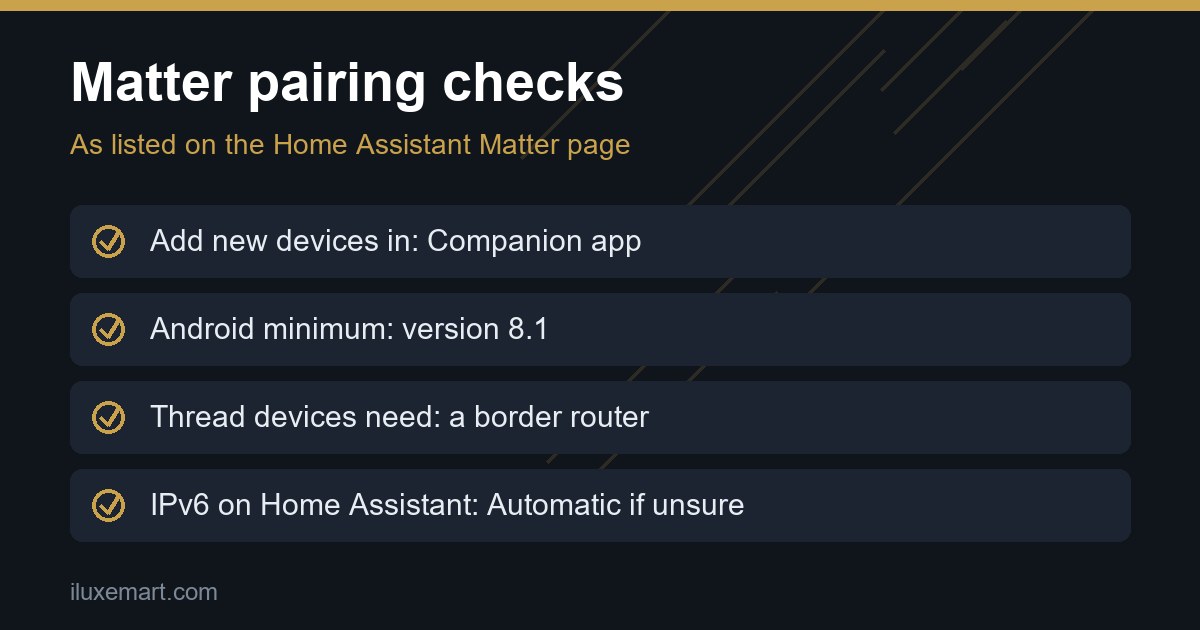
- Home Assistant is open in a browser. The page says adding a new Matter device only works in the Companion app, not the browser. The remedy it gives is to open the Companion app on your phone or tablet and add the device from there.
- The app can’t add Matter devices on your phone or tablet. The page says you see the same message in the app when the phone, tablet or app version does not meet the requirements. That leads to the next check.
In our view, this is the cheapest check on the list, because it needs no settings change.
Matter device not pairing: check the phone requirements
The page lists minimums in more than one place. We report each as that section words it.
Android.
- The minimum is version 8.1, and the page recommends version 12 or higher. It notes older Android versions have drawn more reports of problems.
- Install the app from the Google Play Store. The page says versions without Google Play services, such as the F-Droid version, can’t add Matter devices.
- Keep Google Play Services current.
- Use a standard Android phone signed in with a Google account, not a custom Android build.
iPhone and iPad. The Companion-app-message entry says 16.4; the prerequisites and the Matter-is-unavailable steps say 16 or higher. We did not test which applies. In our view, aiming for the higher number removes the doubt.
Mac. The page says the Mac app can’t add Matter devices, and to use an iPhone or iPad instead.
It also says to have the latest version of the Companion app and the latest version of Home Assistant installed.
Matter device not pairing on Android: “Matter is unavailable”
On Android, the page lists an error saying Matter is unavailable. The page says this could mean not all the Matter modules the Companion app needs have been downloaded yet. The remedies it lists are:
- Allow up to 24 hours for Google Play Services to fetch the Matter modules.
- Meet the requirements in the previous section, including the full Play Store version of the app.
- If you only just installed or updated the app, wait. The page says components install in the background, and to try again after one hour.
- On the Android device, go to Settings > Google > Devices & Sharing. The page says there should be an entry for Matter devices.
- Reinstall the Companion app, or try reinstalling the Google Home app. The page says that is not strictly needed but may prompt the modules to install again.
Matter device not pairing: “Checking network connectivity”
Another Android entry covers a phone stuck on the message Checking network connectivity during commissioning. The page repeats the Android requirements, then adds two network points.
- Thread devices. Make sure the phone is in close range of the border router and your device.
- Wi-Fi devices. The page says many Matter Wi-Fi devices use 2.4 GHz, so the phone should be on that same 2.4 GHz network.
Matter device not pairing: the border router error
For a Thread-based device, the page lists an error saying the device requires a border router. Its stated cause is that a Thread device needs a nearby border router, and the phone must already hold the new Thread network’s credentials.
The page’s prerequisites name the Nest Hub (2nd Gen), Nest Wi-Fi Pro, HomePod Mini or V2, Apple TV 4K, or Home Assistant running the OpenThread Border Router app. Its general recommendations say Thread devices need at least one border router nearby, and that Thread-based Matter devices in Home Assistant need Home Assistant OS version 10 and above.
For the remedy, the page says to set up a Thread border router and sync the Thread credentials from Home Assistant to your Android device. It points to Home Assistant’s Thread page for the steps. That page gives the Android path as Settings > Companion app > Troubleshooting, then Sync Thread credentials. For an iPhone, it says to select Send credentials to phone in the Thread panel. Our Thread border router guide explains why the device matters, and the Thread page is at Home Assistant, Thread.
Matter device not pairing because of IPv6 and multicast
This is the broadest entry. The symptom the page gives is that commissioning keeps failing, devices are not discovered, or devices become unavailable at random. The stated cause is that Matter relies on local IPv6 and mDNS, which is multicast traffic, travelling freely on your network. The page says Matter is designed for regular residential networks and may not work well with enterprise-style setups, naming VLANs, multicast filtering and malfunctioning IGMP snooping.
The checks the page lists:
- IPv6 on Home Assistant. The page says Home Assistant needs IPv6 turned on, but not IPv6 internet or a DHCPv6 server. Go to Settings > System > Network and set IPv6 to Automatic or static. If you’re unsure, the page says to use Automatic.
- Wi-Fi devices. They should be on the same VLAN or VLANs as Home Assistant. That includes a Thread border router.
- Thread-only devices. They should be joined to a Thread network that has at least one border router connected to the Home Assistant LAN.
- Router settings and topology. The page says an “optimize” multicast setting can harm discovery traffic, and to keep your network as simple and flat as possible.
Our guides on an IoT VLAN or guest network and on router privacy settings cover the same trade-off from the privacy side. In our view, anyone who split their smart devices onto a separate network should read this entry before anything else.
Matter device not pairing: the setup basics
The last check is the prerequisites list.
- Packaging. Look for the Matter logo and for either the Wi-Fi or the Thread logo.
- Setup code. Check that the QR code or numeric setup code is on the device. The page says that after a reset you need it to commission the device again, and that without it commissioning is not possible. If the code is only in the paperwork, it suggests photographing it and storing the picture safely.
- Pairing mode. The page says most devices go into pairing mode when powered up, but some need a pairing mode enabled, and the device documentation usually says how.
- Bluetooth. Have a phone ready with Bluetooth enabled, since the page says adding a new device uses the phone’s Bluetooth connection.
- Android location. The page says to set the Companion app’s Location permission to Allow all the time. With the while-using setting, Android limits the background app’s access to the Wi-Fi network name, which the page says can break commissioning.
- Start simple. The page advises keeping the network simple, adding a test device first, and moving on once that works.
Two extra notes: sharing and updates
These are not part of the seven.
Sharing from another platform. If a device is already in Apple Home or Google Home, the page says to choose the option saying it is already in use, then pick the controller, rather than the new-device option. If that fails, it says to check that the Matter integration and the latest Companion app are installed. Our multi-admin sharing guide goes deeper.
Apple border routers and updates. The page lists an error reading Target node did not process the update file. It says updates from Home Assistant are not supported through an Apple Thread border router, because those routers do not forward the mDNS packets needed to find the update provider. The page’s remedy: with only an Apple border router you cannot update from Home Assistant, but you could add another border router, for example by turning Home Assistant into one. With a mix of Apple and other border routers, power down all the Apple ones, wait at least 30 minutes, then retry the update. This concerns firmware updates, not pairing.
A short matter device not pairing checklist
This order for a matter device not pairing is ours, built on the page.
- Open the Companion app, not a browser.
- Check the phone against the Android or iOS minimums above, and the Play Store version of the app.
- On Android, allow time for the Matter modules, then look in Settings > Google > Devices & Sharing.
- Check range and network. For Thread, move the phone close to the device and border router. For Wi-Fi, use the same 2.4 GHz network.
- For Thread, confirm a border router and synced credentials.
- Check IPv6 on Home Assistant and any VLAN, multicast or IGMP settings.
- Recheck the basics: logos, setup code, pairing mode, Bluetooth and Location.
- Then, if needed, download diagnostics. The page’s path is Settings > Devices & services > Matter integration card > three dots menu > Download diagnostics. It says you are usually asked for this file when reporting an issue.
What we could not confirm
- We tested nothing and paired no device.
- The page lists these as causes and remedies. We cannot say any one of them will fix your matter device not pairing problem, or which is most likely.
- The iOS minimum is 16.4 in one entry and 16 or higher in others, and we did not test which applies.
- We did not read the Google guide or the Matter Server Docker documentation the page links to, and we read the Thread page only for the credential steps.
- The page shows no date, so versions and minimums may change. Statements marked in our view are our reasoning, not the Home Assistant project’s.
Your next step
Start with check one and work down the list, stopping when the pairing completes. If a matter device not pairing problem survives all seven, open the Matter page and compare your exact error message with its troubleshooting headings. Then download diagnostics as described above before asking for help. If your network has VLANs, start with our IoT VLAN guide. For the bigger picture, see our Matter ecosystem advice.
How we checked
We read the pages below on 20 November 2026. This is a documentation read, not a test, and we never reproduced a matter device not pairing fault ourselves.
Sources read 20 November 2026: Home Assistant, Matter, Home Assistant, Thread.
More in this series: No-subscription and private smart home guides.