If you want to turn off ACR on a smart TV, the first step is knowing what you are turning off. ACR stands for automatic content recognition, a feature that identifies what is playing on the screen. We read the pages Samsung, LG and Vizio publish about it on 20 November 2026. We tested nothing, and we give no prices and no product picks.
Two things stand out from those pages. Each maker describes ACR as something you can switch off, but only Vizio’s pages give a menu path. And turning ACR off does not necessarily cover everything a TV collects, as Vizio’s own wording shows. Menu names can differ by TV age, as Vizio’s two path lists show, so treat every path below as the maker’s statement, not something we confirmed on a screen. That is why this guide quotes each maker first and only then says how to turn off ACR.
Our earlier post covers the Texas case, so we do not repeat it here. See our smart TV ACR tracking and Texas settlement guide for that background.
Table of Contents
Before you turn off ACR: what the pages say it is
The Samsung support page says a Samsung Smart TV may use ACR technology “to enhance your viewing experience”. When it is on, the page says, the TV generates unique signatures that allow certain information about viewing to be captured. Samsung lists what that information may include: viewing history such as programs watched and the time spent on them, TV identifiers including a Personalized Service ID, and the IP address.
LG’s statement describes ACR as a way to identify content from supported sources. LG says it uses audio fingerprinting through the TV’s internal audio processor, and not through a speaker. Vizio says its ACR can recognize what is playing, including ads, games, connected devices and apps. It calls the resulting collection Viewing Data.
So the word ACR covers a similar idea across the three makers, but the names differ. In our view, that is the main reason a single generic “turn off ACR” guide can mislead. The pages we read are the only sources for what follows.
Turn off ACR on Samsung: what Samsung’s page says
The Samsung page is a US support page titled “Samsung Smart TV Automatic Content Recognition (ACR) Feature”. Here is what it states.
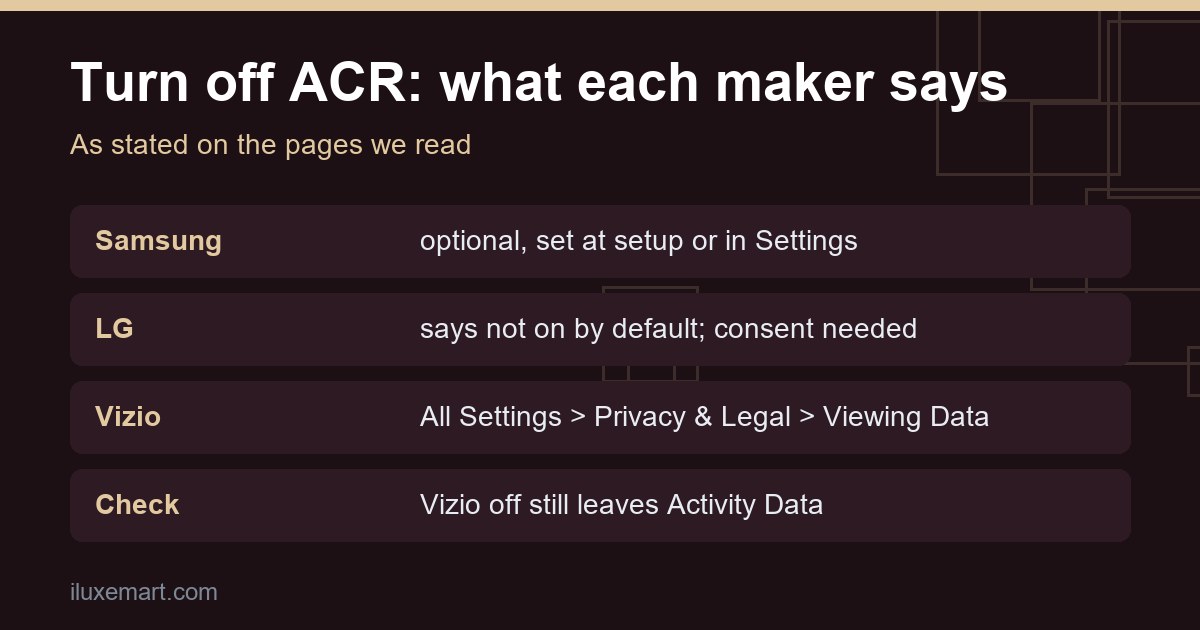
- Samsung says ACR runs only if you agreed to the Viewing Information Services notice at setup, or switched it on later in Settings.
- Samsung says you can change the ACR setting whenever you like, through the TV’s Settings menu.
- Samsung says it does not record or watch the content shown on the TV.
- The page says it applies to all Samsung Smart TVs.
The page gives no menu path. It points to two documents instead: the Viewing Information Services Privacy Notice and the Smart Hub Privacy Notice, both available through the TV’s Settings menu. We therefore do not give a Samsung menu path here, because inventing one would be a guess.
If you want to turn off ACR but do not remember what you agreed to, note that the page does not say where to check which one you did. In our view, that is something to look for in the TV’s own Settings, along with the notices the page names, before you turn off ACR.
Turn off ACR on LG: what LG’s statement says
LG’s source is a global newsroom statement dated 12 September 2026, titled “Understanding privacy on LG smart TVs”. It is LG’s own description of its TVs, so we treat every claim as LG’s claim and not as something independently checked.
LG says:
- ACR, voice recognition and interest-based advertising are optional and, in its words, “not enabled by default”.
- To enable ACR, a user must accept LG’s Viewing Information Agreement. Interest-based advertising needs a separate agreement, and LG says ACR is not used for interest-based advertising unless the user has accepted both agreements.
- ACR does not collect screenshots, screen recordings, video recordings, voice recordings or other audio recordings, according to LG.
- LG says that when ACR is on, it can work on live TV, HDMI-connected devices and LG Channels, but not inside third-party streaming apps such as Netflix or YouTube.
- LG says ACR data collection stops once a user turns ACR off, withdraws consent or files an opt-out request such as Do Not Sell.
The statement also says ACR information may be shared with LG Ad Solutions, which it calls a majority-owned affiliate, and that in certain markets some sharing may count as a sale or sharing under privacy law. It says viewers can choose whether to take part.
The LG statement gives no menu path either. It says consent can be managed or withdrawn through TV settings, and nothing more specific. LG’s statement says ACR is off by default. We cannot tell what any specific LG set shows on screen, because we did not test one. If you own an older LG and want to turn off ACR, in our view it is worth checking the setting directly on your own TV instead of assuming.
Turn off ACR on Vizio: the menu path Vizio gives
Vizio is the only one of the three whose pages give a menu path. The Viewing Data Supplement says the setting can be changed at any time, and it gives the route to turn off ACR on a Vizio.
- All TVs: All Settings > Privacy & Legal > Viewing Data.
- Older TVs: All Settings > Admin & Privacy > Viewing Data.
Vizio’s pages describe Viewing Data as the collection that uses ACR and other technologies. The pages say you are offered a choice about it when you first set up the TV, and that you can switch it off or on later. They also say turning it off will not affect the performance of the TV or any online services.
Several further details appear on those pages.
- Vizio says switching Viewing Data off leads it to delete that TV’s earlier Viewing Data logs.
- It applies only to the TV where you made the change. If you have more than one Vizio, each is its own setting.
- Vizio says a factory reset puts Viewing Data back to Off. You can turn it on again by the same steps.
- If you cannot find the setting, the page gives a contact route: [email protected] or 1-855-472-8817.
On ownership, the pages say Vizio is owned by Walmart, and that this gives you an additional choice about whether Walmart can link Viewing Data to the Walmart account signed in on the TV. The pages say that choice is explained in a separate notice during setup. If you sign in with a Walmart account that has opted out of sale or sharing, Vizio says it will honor that on account-linked TVs with the latest firmware. The same pages add that Viewing Data is still collected unless you switch the Viewing Data toggle off.
What you may still need to turn off besides ACR
This is the part we think matters most when you turn off ACR. The pages we read do not say that switching off ACR ends all data collection. They say several things that point the other way, at least for Vizio.
Vizio Activity Data. Vizio says Activity Data collection carries on after you turn Viewing Data off. The supplement says Activity Data is used to personalize and recommend content inside the TV software or the mobile app. The pages we read give no setting for it.
Ads that were already targeted. Vizio says tailored ads on other devices may carry on for a while, because they came from data shared before you switched collection off.
The advertising ID. Vizio’s Ads and Privacy FAQ describes a TV Ad ID, which it says helps advertisers serve ads on the TV. The FAQ lists a Reset TV Advertiser ID option at these paths:
- After 2024: Menu > Privacy & Legal > Advertising > Reset TV Advertiser ID.
- Before 2024: Menu > Admin & Privacy > Advertising > Reset TV Advertiser ID.
It says resetting replaces the ID, and that you may still get tailored ads, based on data collected afterward.
Limited Ad Tracking. The FAQ describes a Limit Ad Tracking toggle, saying that with it on, Vizio’s platform will not serve tailored ads. You will still see ads, which it says may be less relevant. The paths it gives are:
- After 2024: Menu > Privacy & Legal > Advertising > Limited Ad Tracking.
- Before 2024: Menu > Admin & Privacy > Advertising > Limited Ad Tracking.
The FAQ frames this for older firmware and for TVs without an account or with a Vizio account. It also says Vizio only controls the ads its own platform serves, so apps may still send tailored ads.
Other information. Even with Viewing Data off, the page says Vizio may still collect information you provide in other ways, such as when you contact support or enter a promotion, and may collect information from other sources described in its privacy policy.
For Samsung and LG, the pages we read do not describe an Activity Data setting or an advertising-ID reset. LG separates its voice and advertising agreements from ACR, which in our view means that when you turn off ACR on an LG, it is not the only privacy setting to check. Samsung’s page covers ACR and points to a second notice, the Smart Hub Privacy Notice. We could not confirm what else either TV collects.
A checklist to turn off ACR on your own TV
This checklist is our own reasoning, built on the pages above. Menu names can differ by TV age, and we did not test any TV, so your screens may differ.
- Find the maker’s own page for your brand. Use the links in the sources line below. For a brand not covered here, we read nothing, so we cannot say.
- Open the TV’s Settings and look for privacy options. On a Vizio, try the paths in the section above. On a Samsung or LG, the pages give no path, so read what your own menu shows.
- Turn off ACR or its maker-specific name. Samsung calls the notice Viewing Information Services. LG calls the agreement Viewing Information Agreement. Vizio calls the setting Viewing Data.
- Look at the advertising settings next. On a Vizio, that means Limited Ad Tracking and Reset TV Advertiser ID. On LG, the pages describe a separate interest-based advertising agreement.
- Note the date and screen you changed. In our view, a quick photo of the setting is worth taking, since a software update or factory reset may move or reset it. On a Vizio, a factory reset puts Viewing Data back to Off, according to the page.
If you pass the TV to someone else, Vizio’s page recommends a factory reset before selling or giving it away. Use the list to turn off ACR without missing the settings that sit beside it.
What we could not confirm
- We did not confirm that any TV’s menu matches the pages. We tested no TV, and menu names may differ by TV age.
- LG’s statement is LG’s own claim. We have not verified how its TVs behave, and we do not know what any particular LG set shows.
- Neither Samsung’s page nor LG’s statement gives a menu path, and we give none for them.
- We could not confirm whether turning off ACR on any of these TVs removes data already collected. Only Vizio’s page states deletion of earlier Viewing Data logs, and that is Vizio’s statement.
- We read no pages for Sony, TCL, Roku, Hisense or any other brand, and we make no claims about them.
- The pages show no date other than LG’s statement date, so they may change after 20 November 2026.
- Statements marked in our view are our reasoning, not the maker’s.
Your next step
Pick one TV in your home, open its Settings, and look for the privacy or viewing information option. If you decide to turn off ACR, do it there, then check the advertising settings that sit beside it. If you are still working out which devices in your home send data out, our no-subscription smart home devices guide is a good place to continue.
How we checked
We read each page below on 20 November 2026. This is a documentation read, not a test. We did not buy, set up or run any TV, and we made no network measurements.
Sources read 20 November 2026: Samsung, Smart TV Automatic Content Recognition (ACR) Feature, LG, Statement: Understanding Privacy on LG Smart TVs, Vizio, Viewing Data Supplement, Vizio, Ads & Privacy FAQ.
More in this series: No-subscription and private smart home guides.