An IoT VLAN home network sounds like the safe place for every smart gadget, but isolation can also cut off the local control that makes a private smart home worth having. This guide compares a guest network, AP isolation and an IoT VLAN, and lists four things isolation can break. It is based on pages we read on 16 November 2026. We tested no router. Where the pages are silent, we say “we could not confirm.”
Table of Contents
Three different tools, not one
People use these words as if they mean the same thing. The pages we read treat them differently.
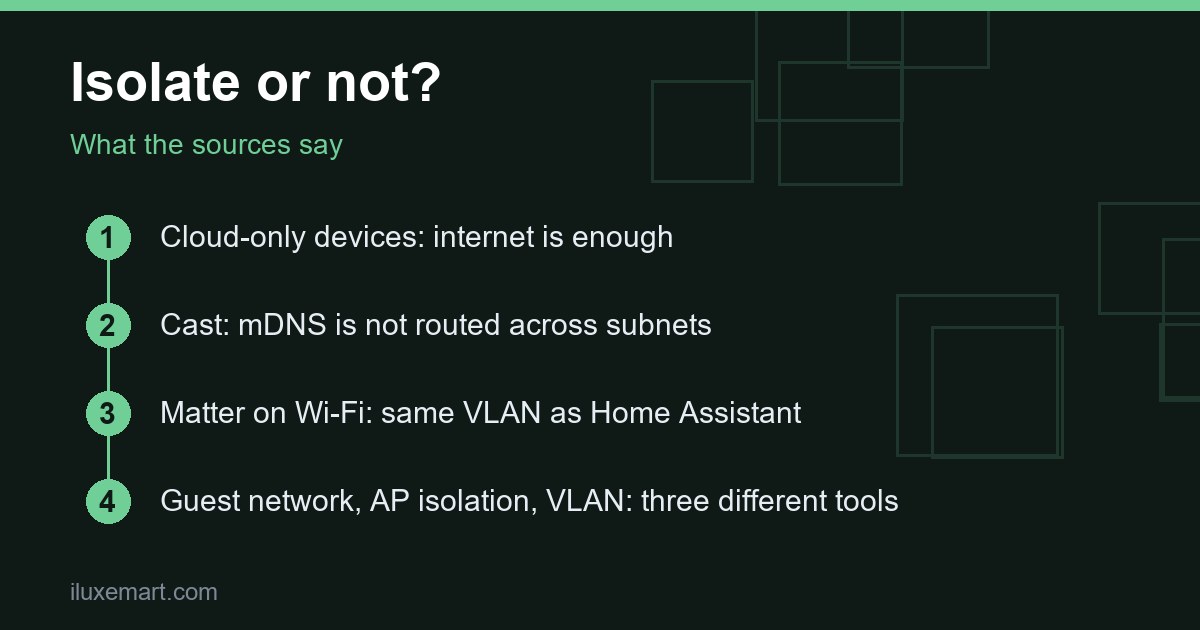
- Guest network. TP-Link’s AP isolation article says a guest network is a completely separate Wi-Fi network with its own name (SSID), fully isolated from the main network.
- Guest network, OpenWrt’s view. The OpenWrt Guest Wi-Fi basics page describes it as an isolated wireless network, independent from the main WLAN, where guests get internet connectivity and restricted LAN connectivity.
- AP isolation. Per TP-Link, this works inside one Wi-Fi network. Devices can still reach the internet, but they cannot see, ping or connect to each other.
- VLAN. None of the pages we read define it. Home Assistant’s Matter page mentions VLANs only in its troubleshooting section, as an example of “enterprise networking solutions” Matter “may not integrate well” with, and as the segment to keep Wi-Fi Matter devices on. In our view, an IoT VLAN home network is the same idea as a guest network, a separate segment for gadgets, but we could not confirm how any particular router builds one.
One more wrinkle comes from TP-Link’s Deco device isolation page. It says Deco’s IoT network gives you a separate SSID but “does not provide isolation policies.” You must add devices to the isolated list separately.
Why people want an IoT VLAN home network
The case for an IoT VLAN home network is mostly about limiting damage. TP-Link’s AP isolation article says smart devices like bulbs, cameras, sensors and locks are often updated less frequently than phones and laptops, so a compromised one could theoretically reach other devices on the same network. It adds that isolation is not a replacement for keeping devices updated.
The Deco page lists three pros: improved network security, less bandwidth contention when devices sit on a dedicated IoT network, and limiting what other devices and companies can see or collect about your network. These are TP-Link’s claims about its own feature, and we could not confirm them independently. The same page lists cons, and those are the rest of this guide.
Cloud-only devices: internet is enough
If a device is controlled only through its maker’s app and servers, it needs very little from your network. The Deco page says isolated devices can still access the internet, and that cloud integrations, hubs and voice assistants can still control them through an active internet connection.
So for cloud-only gadgets, keeping guest network smart devices on the guest SSID is low-risk for function. For a subscription-free, private smart home it is a different question: the page does not say what those devices send to their makers’ servers. Our guide to seeing which servers smart devices contact covers that side.
4 essential things isolation can break
Once you want local control, an IoT VLAN home network gets in the way in the same places. These four items come straight from the pages.
1. Google Cast discovery
Home Assistant’s Google Cast page says Cast devices can only be discovered automatically on the same subnet as Home Assistant, because “mDNS packets are not routed across subnets.” Automatic discovery across subnets is “not recommended and not supported.” The page’s two ways out are mDNS forwarding between the subnets or a list of known hosts, and for mDNS discovery failures in general it recommends giving Cast devices static IPs and configuring a list of known hosts.
TP-Link’s Deco page agrees from the router side: you cannot cast from a main-network device to one that is isolated or on the guest SSID.
2. Matter
The Home Assistant Matter page says Matter relies on local IPv6 and mDNS multicast traffic “traveling freely” in your network. It says Matter “may not integrate well” with VLANs, multicast filtering and faulty IGMP snooping. Its advice: keep Wi-Fi Matter devices, including Thread border routers, on the same VLAN as Home Assistant, and keep the topology “simple and flat.”
It also says IPv6 multicast traffic must travel freely to the Home Assistant host. TP-Link adds that if Matter devices are isolated, the smart hub must be isolated too. For the Thread side, see our Thread border router guide.
3. HomeKit pairing
The HomeKit Bridge page says the iOS device must be on the same local network as Home Assistant for pairing. If the bridge does not appear, it suggests checking your router configuration. It also says to open UDP port 5353 and the integration’s TCP port (21063 by default) if you run a firewall on the Home Assistant system.
For setups where Home Assistant runs in an isolated Docker network, it describes an advertise_ip option with an mDNS forwarder such as avahi-daemon in reflector mode. We could not confirm that this applies to a VLAN split.
4. Local control from your phone or hub
TP-Link’s Deco page says isolated devices cannot communicate with non-isolated devices. Devices “will not be visible as controllable devices and appear unavailable unless sending the commands through a cloud connection.” TP-Link’s AP isolation article says printer access and file sharing stop working, and that smart speakers, streaming devices and hubs that rely on local discovery “may not respond as expected.”
The mDNS standard explains why discovery has such a short reach. RFC 6762 describes Multicast DNS as DNS-like operations “on the local link,” and says names ending in “.local.” are meaningful only on the link where they originate.
What a guest network does under the hood
The OpenWrt page shows an example design: a separate network interface for guests, a wireless network bound to it, a DHCP pool, and a firewall zone. In its example, the guest zone rejects input and forwarding, allows forwarding to the internet, and allows only DNS and DHCP requests to the router.
In our view, that default explains most of the breakage above: guests can reach the internet and almost nothing at home. We did not test it, and this page does not show how to let one specific device, such as Home Assistant, talk to a guest device. It points to a separate “Guest Wi-Fi extras” page for tuning, which we did not read. The page says to check your firewall rules with ping, ping6 or nmap.
Which setup suits your devices?
This list for choosing an IoT VLAN home network or a guest network is our reasoning from the pages, not a ruling from any vendor.
- Cloud-only, no local control wanted: a guest network or isolation works, since internet is all these devices need.
- Controlled by Home Assistant locally: keep the device and Home Assistant on the same network. If you isolate Matter devices, the Deco page says the smart hub must be isolated too.
- Cast or HomeKit: same subnet, or plan for mDNS forwarding or known hosts.
- Matter over Wi-Fi: same VLAN as Home Assistant, as flat as you can.
- Mixed home: start small. Isolate only the devices you know are cloud-only, and leave the rest.
If you do decide to isolate smart home devices, move one device first and check it still works from your phone and from your hub. For the router itself, see our router vulnerability check and our mesh Wi-Fi buying guide.
Honest limits
- We tested no router, VLAN or guest setup; everything is documentation.
- We read nothing about vendors other than TP-Link, OpenWrt and Home Assistant, so we say nothing about other routers.
- No page we read guarantees a result. A separate segment reduces exposure in the vendors’ view; it does not make a device safe.
- Pages change. Re-read yours before you rebuild your IoT VLAN home network.
IoT VLAN home network: your next step
Before you build an IoT VLAN home network, list your devices and mark each one cloud-only or locally controlled. Cloud-only ones can go on a guest network. Locally controlled ones should stay with their controller. More privacy-first guides are in our no-subscription smart home guides.
How we checked
We read each page below on 16 November 2026. This is a documentation roundup; we did not test any router or device. Claims marked “in our view” are our own reasoning.
Sources read 16 November 2026: OpenWrt, Guest Wi-Fi basics, TP-Link, Using Device Isolation on Deco, TP-Link, What Is AP Isolation?, Home Assistant, Google Cast, Home Assistant, Matter, Home Assistant, HomeKit Bridge, RFC 6762, Multicast DNS.
More in this series: No-subscription and private smart home guides.