A UPS for router, NAS and Home Assistant box is a small battery backup for network gear. NUT documents software that can shut connected computers down cleanly before the battery runs out. We read the Network UPS Tools (NUT) documentation and the Home Assistant NUT page to see what they say. We tested nothing. This is a documentation roundup, and we give no prices, no sizing numbers, no runtime claims and no brand picks. Where the pages are silent, we say “we could not confirm.”
The five checks for a UPS for router and NAS use below cover what to plug in, how NUT works, what Home Assistant adds, how to check compatibility before you buy, and what to do about the battery. If you are still choosing the gear itself, see our NAS buying guide and our mesh Wi-Fi buying guide.
Table of Contents
UPS for router: why a small one suits network gear
Start with the one line that matters most. The NUT features page says to be sure to plug your network’s physical hardware (switches, hubs, routers, bridges and so on) into the UPS. The page gives no separate explanation for it, so the reasoning that follows is ours.
In our view, the logic is simple. A router is the thing every other device depends on. If a short cut drops it, your NAS, your Home Assistant host and your smart devices lose their network at the same moment, even when the gear they run on stays powered. A UPS for router duty keeps that link up, at least for as long as the battery lasts. We could not confirm how long that is for any model, because the pages we read give no runtimes.
The same reasoning applies to the other two items in the title:
- The router (and any switch). In our view, it keeps the network alive while the battery lasts.
- The NAS. In our view, a NAS is the item most likely to benefit from a clean shutdown, because it is writing to disks. The NUT manual says the most important task of its monitoring client is “shutting down the operating system cleanly before the UPS runs out of power”. We could not confirm how a given NAS brand handles this, and we did not test one. Our NAS buying guide covers the box itself.
- The Home Assistant host. In our view, the same clean-shutdown point applies. The Home Assistant NUT page covers monitoring and notifications, not shutting the host down. We could not confirm the integration does this. Our test restore guide and USB backup guide cover what to do if a host is damaged anyway.
A UPS is not a backup. In our view, it reduces one risk, a sudden power loss, and nothing else.
What NUT is, in plain terms
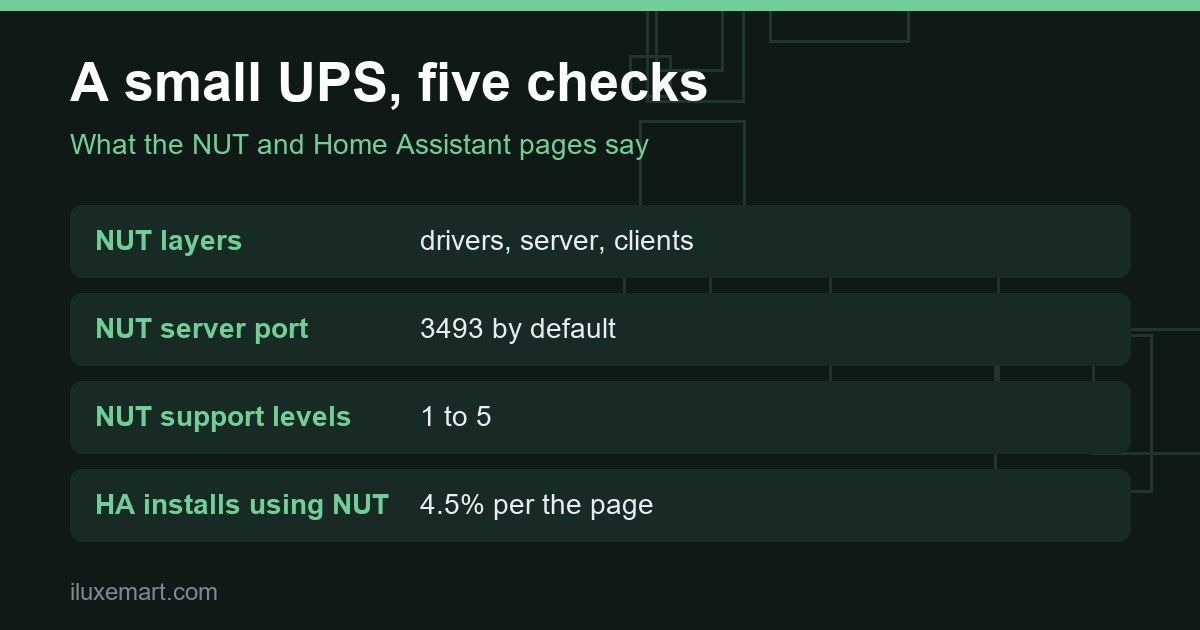
NUT is a collection of programs that gives UPS, PDU and similar hardware a common interface. The user manual describes a layered approach, and the features page names three layers: drivers, server and clients.
- Drivers understand the specific language of each device. They run on the same host as the server.
- The server, upsd, caches the information from the drivers and answers queries from clients.
- Clients, such as upsmon, check on the hardware and act when needed. The manual calls safe shutdown when the power fails the essential feature of upsmon.
The part that matters for a home with several devices is the network design. The manual says that, because monitoring over the network is built in, you can hang many systems off one large UPS, and “they will all shut down together”. The features page describes this as a setup with one UPS and several computers. Only one computer talks to the UPS directly. It runs the driver, the server and upsmon in primary mode, and the other systems run upsmon in secondary mode and connect to the primary.
The manual also says that for a typical home user there is one computer connected to one UPS. The pages we read do not say which routers or NAS models can act as a NUT client. We could not confirm how well a router or a NAS fits into this design. In our view, that is a question for each device’s own documentation.
UPS Home Assistant: what the NUT integration does
Home Assistant has a Network UPS Tools (NUT) integration, and this is the page for anyone searching for a UPS Home Assistant setup. The page states early on that the integration “cannot communicate directly with a UPS or power device”. A NUT server is required. In other words, a NUT UPS Home Assistant setup has two parts: a NUT server that talks to the UPS, and Home Assistant, which talks to that server.
What the page says about setup:
- Discovery. NUT can be auto-discovered. If it is not, you add it manually under Settings, then Devices and services.
- Host and port. You enter the IP address or hostname of the NUT server. The default port is 3493.
- Address changes. The page says it is not possible to automatically detect a NUT server IP address change. Use a static IP address, a fixed DHCP reservation, or DNS as appropriate.
- Credentials. The username and password are optional. But the account must be granted instcmds permissions on the NUT server for buttons, switches and device actions. Without credentials, those are not available.
- Sensors. Only the sensors and diagnostic sensors your device reports are added. Most diagnostic sensors are disabled by default.
- Polling. The page lists the IoT class as Local Polling, with a default interval of once every 60 seconds that you can change.
The page’s two example automations notify you when the UPS status changes to on battery, and when battery charge falls below 25 percent. The 25 percent figure is the page’s example, not a recommendation. In our view, a notification is only useful if Home Assistant itself is still running, so the Home Assistant host and the router in front of it are worth keeping on the same UPS.
The known limitations are short. The integration supports only a subset of NUT variables and commands. It can read variables but not set them. It does not support commands that need parameters. The page also says the integration is used by 4.5% of active installations and carries a Platinum quality mark. We could not confirm how many of those installs run a UPS at home, and we do not read the figure as a recommendation.
UPS for router and NAS: check compatibility before you buy
The NUT hardware compatibility list (HCL) is the place to check. The page says to look at its acknowledgements and footnotes before you buy, and it carries a support level legend:
- Protocol based on reverse engineering.
- Based on fragments of publicly available protocol.
- Based on publicly available protocol.
- Vendor provided protocol.
- Vendor provided protocol and hardware.
In our view, a higher level suggests firmer ground, though the page does not say a higher number means a better UPS, and we could not confirm that it does. The list covers many manufacturers and device types, and it is long. We did not search it for any model, and we recommend none.
The NUT FAQ entry on which UPS to buy is blunt. The developers say they cannot take responsibility for recommending a UPS, citing the licence’s lack of warranty and the risk that a manufacturer has changed the internals without changing the model name. In our view, this is the strongest argument for checking the exact model and hardware revision against the list, and for choosing a retailer with an easy return policy. The FAQ’s own answer is a UPS with a no-questions-asked money-back guarantee.
The manual adds one more distinction. A generic contact closure UPS tends to be cheaper and provides only the simplest data about power and battery status, and it says battery charge readings need a smart UPS and a driver that supports it. In our view, that matters for Home Assistant, because the battery charge sensor in the integration’s examples depends on the device reporting it. We could not confirm which models report what.
A plain buying checklist for a small UPS
This UPS for router buying list is our reasoning, built on the pages above. It is not a recommendation of any product.
- List what you will plug in. In our view, start with the router, any switch, and the NAS. Add the Home Assistant host if it is a separate box. In our view, keep non-essential items off the UPS.
- Add up the loads from their own labels. We give no numbers, because the pages we read give none. In our view, read each device’s rating label or manual, and compare the total with the UPS’s own specification. We could not confirm a safe margin.
- Check the connection and the model. The features page lists serial, USB and network connections (SNMP, Eaton / MGE XML/HTTP and IPMI) as supported. In our view, a USB data port is the simplest route for a home, but confirm what the listing for your model says. Then check the exact model against the HCL, note the support level and any footnote, and re-check the model name and revision at the shop, given the FAQ’s warning.
- Plan the NUT host. One system has to be the primary that talks to the UPS. Give it a fixed address, as the Home Assistant page asks. We could not confirm which devices can run this role.
- Plan the battery. See the next section.
Battery care for a UPS for router use
A UPS for router, NAS and Home Assistant gear needs a battery you can trust. The features page mentions that a helper user can be limited to non-destructive tasks such as a battery test. It then adds a warning: with a worn-out battery whose replacement is a few years overdue, a capacity or remaining-runtime test can still be destructive, by powering off the load abruptly. In our view, that is a reason to know the battery’s age before you run any test with the router, NAS and Home Assistant host attached. In our view, test during a quiet moment, and have the NAS shut down first if you are unsure.
The pages we read do not say how long a battery lasts, how often to replace it or how to test it. We could not confirm any of that, so follow the maker’s own manual. The Home Assistant page lists diagnostic sensors for battery date and battery runtime. Some values, such as battery date, are marked as opaque by the manufacturer, meaning they may vary by manufacturer. The runtime is described as an estimate by the device. In our view, do not rely on a displayed runtime until you have seen how your own model reports it.
Also keep the Home Assistant side in mind. The router sits in the middle of everything, so our guide to router privacy settings for a smart home is worth a read while you are already behind the shelf.
Honest limits of this UPS for router guide
- We tested nothing. This is a documentation roundup, not a setup log.
- We give no runtimes, no VA or watt sizing, no prices and no brand picks, because the pages give none.
- We could not confirm which routers and NAS models can act as NUT clients, or how long any battery lasts.
- We did not search the HCL for any model.
- The 4.5% figure and Platinum rating are as shown on the Home Assistant page on the day we read it.
- Statements marked “in our view” are our reasoning, not the sources’.
Your next step
Write down your list for your UPS for router setup: router, switch, NAS and Home Assistant host. Then read the NUT hardware compatibility list’s legend and footnotes before you look at any shop page. For more local-control guides, see our no-subscription smart home guides.
How we checked
We read each page below on 19 November 2026. This is a documentation roundup of a UPS for router, NAS and Home Assistant use. We did not buy, install, connect or test any UPS, router, NAS or software. NUT’s features page says its list may lag the current code. Claims marked “in our view” are our own reasoning.
Sources read 19 November 2026: Home Assistant, Network UPS Tools (NUT), Network UPS Tools, Features, Network UPS Tools, User manual: Overview, Network UPS Tools, FAQ, Network UPS Tools, Hardware compatibility list.
More in this series: No-subscription and private smart home guides.