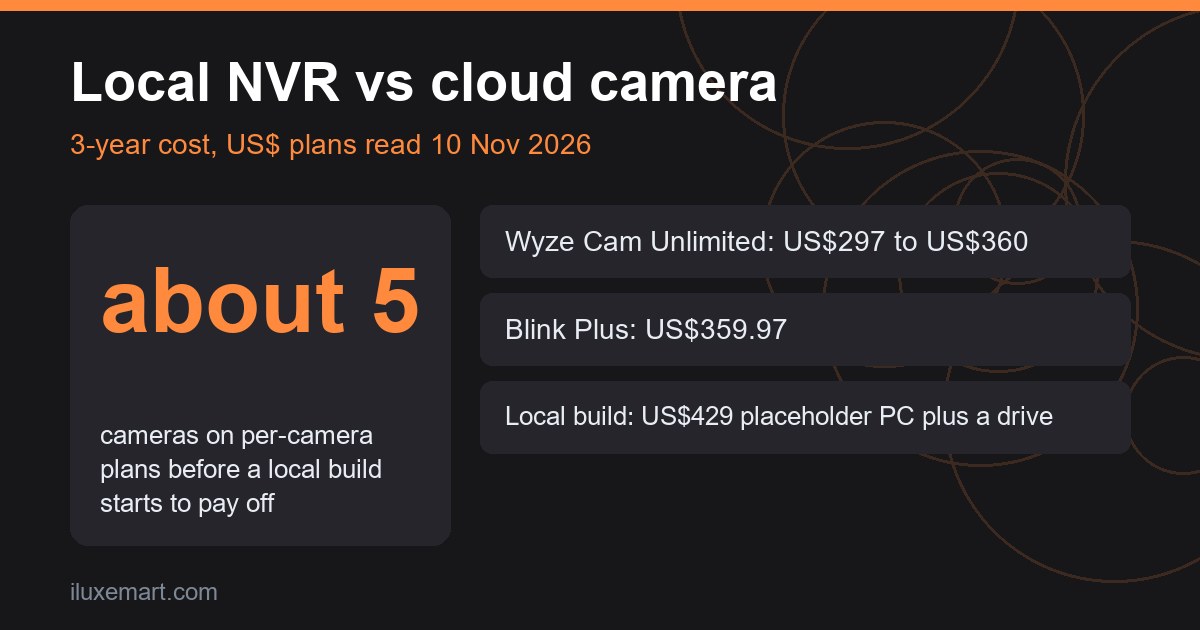
In a local NVR vs cloud camera comparison, a new local build only starts to beat per-camera cloud plans at around five cameras, and unlimited cloud plans beat it at any camera count unless you already own the hardware. Local still wins on other things, such as no monthly fee and keeping footage on your own network. Below is the arithmetic from prices I read on 10 November 2026, the formula so you can redo it, and the parts a spreadsheet misses.
All prices are examples as read on 10 November 2026. They vary by region, change often, and are not a guarantee of what you will pay.
Table of Contents
The short answer
Cloud plans charge every month. A local NVR (network video recorder, here a small computer running Frigate) charges once up front. In a local NVR vs cloud camera choice, the question is whether the one-off cost is lower than 36 months of fees for your number of cameras.
Cameras cost the same either way, so I leave them out of both sides.
Local NVR vs cloud camera: the 3-year formula
- Cloud: plan price x 36 months (or yearly price x 3), multiplied by the number of cameras if the plan is per camera.
- Local: one-off computer + storage drive + any accelerator, plus electricity (not priced here, because I found no sourced figure).
What cloud camera subscription cost looks like
Here is the cloud camera subscription cost for three brands whose price pages I could open. The tables use different currencies, so check the label on each. “Yearly x 3” uses the yearly price printed on the page.
Ring Protect (Australian storefront)
Read at ring.com/protect-plans, which showed Australian prices in A$. New Zealand shoppers saw the same numbers as NZ$.
| Plan | Covers | Price as read | 3-year total (yearly x 3) | 3-year total (monthly x 36) |
|---|---|---|---|---|
| Solo | one device | A$49.95 a year, A$4.95 a month | A$149.85 | A$178.20 |
| Multi | all devices at one location | A$149.95 a year, A$14.95 a month | A$449.85 | A$538.20 |
| Pro | all devices at one location | A$299.95 a year, A$29.95 a month | A$899.85 | A$1,078.20 |
See the page for feature differences between plans. It also lists add-ons, “Pro Intelligence” (+$5 a month per camera) and “24/7 Continuous Recording” (+$4 a month per camera), in a bare “$” with no currency stated. Four Solo plans would cost 4 x A$149.85 = A$599.40, so Multi is cheaper at that size.
Wyze Cam Plus and Cam Unlimited (US dollars)
Read at wyze.com/products/cam-plus, priced in US dollars:
| Plan | Covers | Price as read | 3-year total |
|---|---|---|---|
| Cam Plus | per camera | US$2.99 a month | US$107.64 per camera (US$430.56 for 4, US$538.20 for 5) |
| Cam Unlimited | unlimited cameras | US$9.99 a month or US$99 a year | US$359.64 (monthly x 36) or US$297.00 (yearly x 3) |
The page describes moving Cam Plus subscriptions to the Cam Unlimited plan.
Blink (US storefront)
Read at blinkforhome.com/plans. The page uses “$” without a currency code and says prices are plus applicable tax; I read it as US$.
| Plan | Covers | Price as read | 3-year total |
|---|---|---|---|
| Basic | one device | US$39.99 a year, US$3.99 a month | US$119.97 per device (US$479.88 for 4, US$599.85 for 5) |
| Plus | unlimited devices | US$119.99 a year, US$11.99 a month | US$359.97 (yearly x 3) |
Blink also lists higher-priced “ai” tiers, which I left out. Features vary by region: Blink’s own pages (plans, subscription FAQ) say ai plans are not available in Illinois, and Known Faces is not available in Illinois, Texas and Portland, Oregon. Prices change.
What a local NVR costs
For the local side I used the Frigate documentation, since Frigate is a popular open-source option. The hardware page says an Intel CPU with AVX and AVX2 that can run Debian should work fine, and that decoding video “takes a significant amount of CPU power.” The planning page adds:
- RAM: 4 GB is generally sufficient for a very basic setup with a few cameras, 8 GB with enrichments, and 16 GB is highly recommended for most users, especially those with many cameras (8+).
- For 1 to 6 cameras with occasional motion, “a single, entry-level AI accelerator will suffice.”
- Hardware video decoding is “highly recommended” for multiple cameras.
- SSDs and hard drives both work. For hard drives it recommends surveillance-rated ones, and it prefers local storage to network storage.
The hardware page says the Google Coral “is no longer recommended for new Frigate installations”, so I do not price one. The installation page recommends Docker Compose on Debian-based Linux. The docs discourage virtual machines in general (they also give separate Proxmox guidance). Windows is not officially supported, though some users run Frigate under WSL or VirtualBox. The Home Assistant integration is separate and still required if you use Home Assistant.
The one hardware price I could read
Frigate names the Beelink EQ13 (Intel N100) as the author’s favourite, but I could not read a price for it. The only mini PC price I read was on a Beelink page showing the EQR5 at US$429.00, reduced from US$589.00 (currency not stated, read as US$), configuration not stated. The EQR5 is AMD and Frigate asks for an Intel CPU with AVX and AVX2, so I make no compatibility claim. Treat US$429 as a placeholder only. I read no drive price, so storage is the unknown “D” below.
Putting it together: example, prices as read on 10 November 2026
In this local NVR vs cloud camera table, local cost is the US$429 placeholder PC plus a drive (price unknown, “D”). All figures in US$; Ring is left out because it is in A$:
| Setup | 3-year cost |
|---|---|
| Wyze Cam Unlimited, any number of cameras | 297.00 to 359.64 |
| Blink Plus, unlimited devices | 359.97 |
| Wyze Cam Plus, 4 cameras | 430.56 |
| Blink Basic, 4 cameras | 479.88 |
| Wyze Cam Plus, 5 cameras | 538.20 |
| Blink Basic, 5 cameras | 599.85 |
| Local: placeholder PC + drive | 429 + D |
My judgement from these numbers:
- Against the unlimited plans, a new local build costs more at any camera count, because US$429 is already above US$297 to US$360 before the drive.
- Against Wyze Cam Plus at 4 cameras (US$430.56), adding any drive makes local dearer.
- At 5 cameras, Wyze Cam Plus leaves about US$109 for a drive, and Blink Basic about US$171. So about five cameras on per-camera plans is the rule of thumb (four on Blink Basic if the drive costs under about US$51).
- Ring’s plans are in A$ and I have not converted them, so compare those yourself at the current rate.
Local gets better if you reuse a computer you own. Our home NAS backup guide covers the one-off-versus-subscription trade-off for storage, though it is about files rather than Frigate.
Where cloud wins in a local NVR vs cloud camera comparison
- No setup. Plug in, scan a code, done. Frigate means Docker, a config file and some tuning.
- Off-site clips. When the plan stores clips in the cloud, they survive a break-in that takes your recorder (my reasoning).
- Support and updates. Someone else fixes outages and patches software.
Where local wins in a local NVR vs cloud camera comparison
- No recurring fee, and no plan changes to track. Wyze’s page, for example, describes moving subscriptions to a new plan, so cloud terms can shift.
- Footage stays on your network by default, as far as I can tell (my reasoning, not a documented guarantee). The Frigate record docs say recordings are written directly from the camera stream without re-encoding.
- You choose retention, in days, per camera. The docs add that when disk space runs low, Frigate deletes the oldest recordings regardless of retention settings.
The catch: local recording does not protect against theft or fire unless you also keep an off-site copy.
Frigate vs cloud camera: who should pick which
Judgement: choose cloud if you have a handful of cameras on unlimited plans, want zero maintenance, and accept a monthly bill. Choose local if you have about five or more cameras on per-camera plans, already own a spare PC, or do not want footage leaving your network. A mix works too: a doorbell on a cheap cloud plan and the rest on Frigate.
For doorbell models, see our no-subscription doorbell camera guide and video doorbell buying guide. For how local cameras fit with Matter, see why “pick one ecosystem” advice is outdated. If you run Home Assistant, take a backup to a USB drive before adding Frigate.
What I could not verify
- Prices for Google Nest Aware, Arlo Secure and Eufy: I could not open a working price page, so they are left out.
- The price of a storage drive, an Intel N100 mini PC or an accelerator, the electricity cost of running a recorder around the clock, and whether any specific mini PC meets Frigate’s requirements.
Next step
For your own local NVR vs cloud camera check, count your cameras, write down the plan price from your vendor’s page today, multiply by 36, then price a computer and drive in your own currency. If the local number is lower, read the Frigate planning guide before buying anything.
Sources read 10 November 2026: Ring Protect plans, Wyze Cam Plus, Blink plans, Beelink EQR5, Frigate docs (hardware, installation, planning, record).
More in this series: No-subscription and private smart home guides.