The ONVIF vs RTSP question has a short answer: they do different jobs. RTSP sets up and controls a video stream. ONVIF is a set of interoperability specifications for IP security products, covering things like configuration, events and control. This guide, based on pages we read on 15 November 2026, explains what each does and which one your camera needs for Home Assistant. We did not test any camera. Where the pages are silent, we say “we could not confirm.”
A camera RTSP Home Assistant setup can be as simple as pasting one URL, while the ONVIF route adds device features on top. If you are still deciding whether to keep cameras off the cloud, start with our local NVR vs cloud camera guide.
Table of Contents
What is ONVIF?
ONVIF publishes specifications for IP-based physical security products. Its profiles page explains that a profile is a fixed set of features a conformant device and client must support, so a Profile T client works with a Profile T device.
The page adds a strict rule: only registered products with conformance to a profile are considered ONVIF conformant. In our view, that is worth remembering when a product listing simply says “ONVIF.”
The video profiles you will meet
The profiles page says video systems can use Profiles D, G, M, S and T. Two matter most here.
- Profile S is basic video streaming and configuration: a device, such as an IP camera, sends video to a client that can configure, request and control the stream. It also covers PTZ control, audio in, multicasting and relay outputs, where supported. The page says “Profile deprecation in process; last date of product conformance submissions is March 31, 2027.” That concerns new conformance submissions, and we could not confirm what it means for devices already conformant.
- Profile T is advanced video streaming: H.264 and H.265 encoding, imaging settings, and motion and tampering events, plus metadata streaming and bidirectional audio where supported.
The profiles page also notes that a camera with local storage can conform to both Profile T and G; we read no separate Profile G page. Profile Q is deprecated as of April 1, 2022.
What is RTSP?
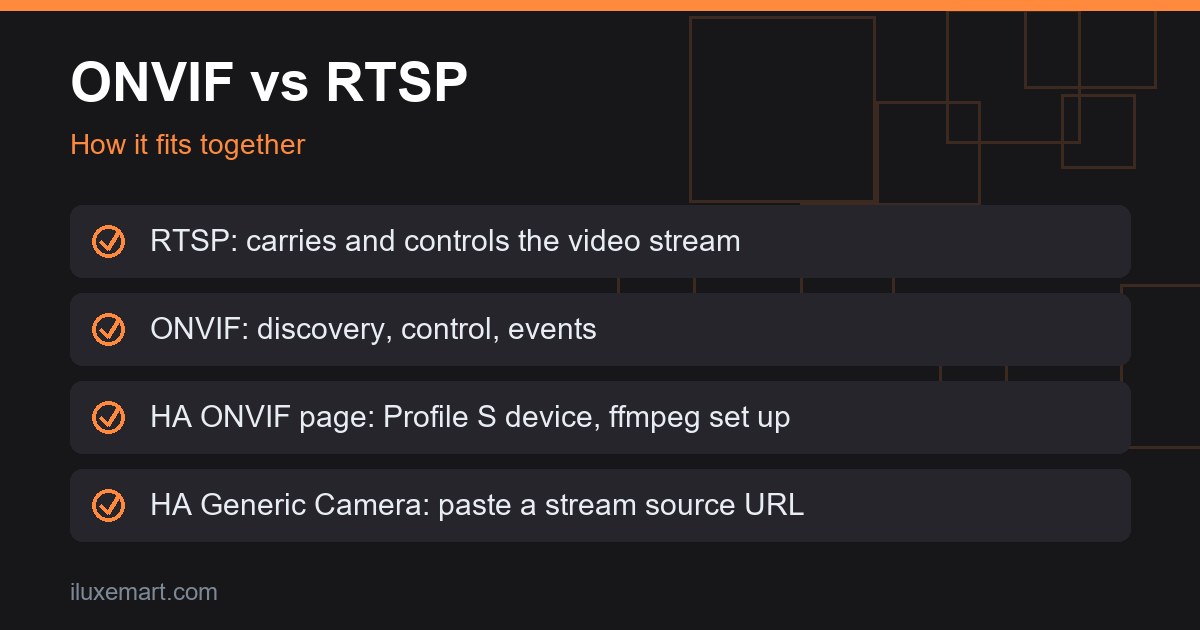
RTSP stands for Real-Time Streaming Protocol. RFC 2326 calls it an application-level protocol for control over the delivery of real-time data such as audio and video, and says it does not typically deliver the continuous streams itself.
RFC 7826, dated December 2016, defines RTSP 2.0 and obsoletes version 1.0. We could not confirm which version any particular camera uses.
ONVIF vs RTSP: what each one does
Side by side, ONVIF vs RTSP is not a contest between alternatives. Based on the pages we read:
- RTSP is about the stream. A client opens an
rtsp://address. - ONVIF is about the device. Home Assistant’s ONVIF page describes events, switches and PTZ actions alongside video.
- They connect. The go2rtc project lists ONVIF among its input protocols, describing it as “a popular ONVIF protocol for receiving media in RTSP format.” We read that as ONVIF and RTSP being used together, but we could not confirm from the pages we read how a client learns the stream address.
One more point on ONVIF vs RTSP: Frigate’s autotracking page says an ONVIF connection is required for autotracking, and it refers to ONVIF presets in the camera firmware for returning after tracking. It also says autotracking needs a PTZ camera capable of relative movement. In our view, that is something a plain stream address does not provide.
What Home Assistant’s ONVIF integration needs
The ONVIF integration page says it lets you use an ONVIF Profile S conformant device and requires the ffmpeg integration to be configured already. It can be auto-discovered under Settings, Devices and services. The page adds:
- Create a dedicated user on the camera for Home Assistant; a standard user is enough for all current functionality.
- It adds entities for profiles with video encoding set to H.264. The first profile is usually the highest quality and is the default.
- Options include the RTSP transport mechanism (tcp, udp, udp_multicast or http) and extra FFmpeg arguments.
On events and extras, the page says:
- If the device supports webhooks, the integration tries one; turning that off falls back to PullPoint, if supported.
- Events such as motion and tamper become sensors via the PullPoint subscription API. There are switches for the IR lamp, autofocus and wiper, and a PTZ action.
The H.265 trap
The same page lists the error “No usable cameras were found.” Its stated cause is that many newer cameras default to H.265 while the integration looks for H.264. Its fix is to set at least one stream, such as a secondary stream, to H.264.
Camera RTSP Home Assistant: the Generic Camera route
The Generic Camera page says it integrates any IP camera or other URL. You must enter a Still Image URL or a Stream Source URL; the page’s example stream source is rtsp://192.168.1.21:554/. Username, password, RTSP transport and authentication type (basic or digest) are optional.
A stream source with no still image URL works only if the stream integration is configured, per the page. Home Assistant’s camera page adds that the stream integration is what lets you stream in the frontend, if your camera supports it.
The stream integration page says it can proxy H.264 and H.265 sources, but H.265 does not work in many browsers. The page calls that a browser limitation, not a Home Assistant issue.
For a camera RTSP Home Assistant setup, that page does not list sensors, switches or PTZ actions, and we could not confirm any ONVIF-style events through it. In our view, that is the trade: less setup, fewer features.
Main stream vs sub stream in ONVIF vs RTSP setups
Many cameras offer more than one stream. In the Amcrest, Dahua and Hikvision examples on Frigate’s page, in an ONVIF vs RTSP setup the RTSP URL decides which you get. Frigate’s camera-specific page shows subtype=0 as the main stream and subtype=1 as the sub stream for Amcrest and Dahua, the latter “typically supporting low resolutions only.” Its Hikvision example uses channel 101 for main and 102 for sub.
Frigate’s hardware page says multiple substreams let different resolutions serve detection, streaming and recording without re-encoding, and that H.264 video with AAC audio is the most compatible.
Privacy and no subscription
In our view, on privacy ONVIF vs RTSP is not the deciding factor, since both are ways of reaching a camera. The Home Assistant ONVIF and Generic Camera pages both give their IoT class as Local Push, which is how Home Assistant classifies the integration’s connection to the device. We saw no mention of a vendor cloud account or fee on either page, but that says nothing about what a particular camera does with its own app or cloud features.
The limit is our evidence: we could not confirm what any specific camera does with its own app or cloud features. See our no-subscription doorbell camera buying guide and our Matter cameras guide.
Limits: what ONVIF conformance does not promise
ONVIF conformance means a product has registered conformance to a profile. It does not mean every feature works in every client.
- Compliance with regulations is outside the scope of ONVIF, per the profiles page. Manufacturers, architects and integrators are responsible for regulatory requirements, solid design and the right security level.
- Frigate’s autotracking page says the ONVIF Conformant Products Database feature list is a starting point, and that “some cameras still fail to respond even if they claim support.”
Which does your camera need?
This is our reasoning on ONVIF vs RTSP from the pages above, not a ruling from either project.
- Video only, and the camera lists an RTSP address: the Generic Camera route may be enough.
- Want motion or tamper sensors, or PTZ and IR controls: check for ONVIF Profile S support first.
- Camera streams only H.265: expect “No usable cameras were found” until one stream is H.264.
- Frigate-style detection: look for a lower-resolution sub stream.
ONVIF vs RTSP: your next step
So, onvif vs rtsp comes down to this: RTSP is the stream, and ONVIF is the device standard around it. Find your camera’s manual, look for an ONVIF Profile S or T mention and an RTSP URL format, then pick the integration. More privacy-first guides are in our no-subscription smart home guides.
How we checked
We read each page below on 15 November 2026. This is a protocol explainer from those pages; we did not test any camera. Claims marked “in our view” are our own reasoning.
Sources read 15 November 2026: ONVIF profiles, ONVIF Profile S, ONVIF Profile T, Home Assistant, ONVIF, Home Assistant, Generic Camera, Home Assistant, Camera, Home Assistant, Stream, Frigate camera specific, Frigate hardware, Frigate autotracking, go2rtc, RFC 2326, RFC 7826.
More in this series: No-subscription and private smart home guides.