Home Assistant remote access without Nabu Casa is possible, but first ask whether you need remote access at all. This guide compares the options using the official docs, and it covers the safety warnings you should read before you open anything up. We opened every source on 12 November 2026. Where a page was silent, we write “we could not confirm” instead of guessing.
Table of Contents
Do you need remote access at all?
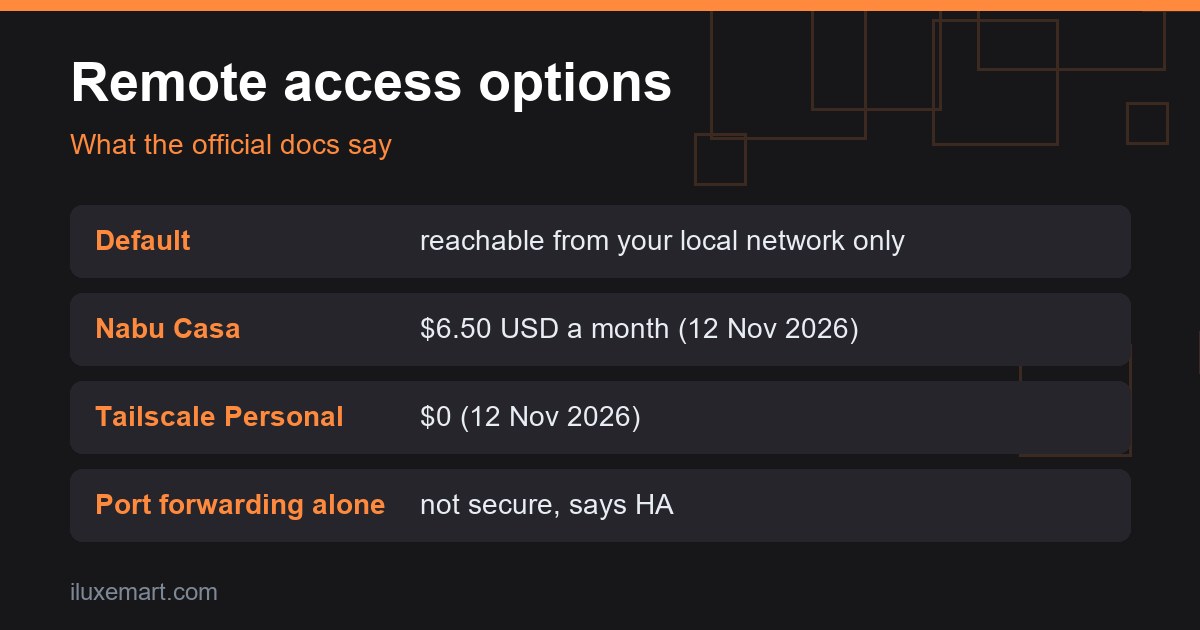
By default, Home Assistant can only be reached from your local network. The remote access page says this keeps things private and secure. If you only control your home while you are in it, you may need nothing extra.
Remote access matters when you want to control devices from work or on holiday. It also matters for the Companion app on your phone: the same page says that without a connection to your home, your phone’s sensors will not update in Home Assistant.
If that is not you, you do not need Home Assistant remote access without Nabu Casa or anything else. Stop here. In our view, less exposure is the simplest safety measure.
Home Assistant remote access without Nabu Casa: the official options
The remote access page names four routes: Home Assistant Cloud (to be renamed Home Assistant Link on 2 December), a VPN, a reverse proxy and port forwarding. It calls Home Assistant Cloud the easiest and safest option for most people, and says the others are for people who prefer to set things up themselves.
The page also carries a tip: before exposing Home Assistant to the internet, follow the securing checklist. We cover that checklist below. First, the paid baseline, so you know what you would be replacing.
What Nabu Casa costs, and what you get
Home Assistant Cloud, sold by Nabu Casa, needs no open ports on your router. The remote access page says setup takes a single toggle, a unique remote URL is generated for you, and traffic between your device and your home is encrypted automatically.
The Nabu Casa pricing page shows $6.50 USD monthly or $65.00 USD annually, tax not included. Those are the prices as shown on the page on 12 November 2026, and prices change, so check the page itself. The page offers a 31-day free trial and says no card details are required.
The same page says that on 2 December, Home Assistant Cloud becomes Home Assistant Link; the Home Assistant docs we read still call it Home Assistant Cloud. Besides remote access, the page lists offsite backups, Alexa and Google Home voice control and speech processing. It also says the subscription funds Home Assistant development. If you only want backups off-site, our Home Assistant backup to USB guide covers a local alternative.
If you subscribe to Home Assistant Cloud, the Home Assistant Cloud integration page also shows two automations that turn Cloud remote access on when you leave home and off when you arrive. They use the cloud.remote_connect and cloud.remote_disconnect actions, so they apply only to Home Assistant Cloud (Link), not to Tailscale, WireGuard or port forwarding.
Home Assistant Tailscale: the VPN route
The remote access page names Tailscale and ZeroTier One as VPN examples. It says a VPN connection must be established before you can reach Home Assistant from outside your network, and that the VPN is what makes the connection secure.
For Home Assistant Tailscale, the Home Assistant Community Apps Tailscale app documentation (a community repository, not Tailscale’s own docs) says you need a Tailscale account and can sign up with Google, Microsoft or GitHub. It says Tailscale is free to use for personal and hobby projects, up to 100 clients/devices on a single user account.
Tailscale’s own pricing page is the authority. It shows a Personal plan at $0, described as free forever, with unlimited user devices, up to 6 users, up to 3 ACL groups and up to 50 tagged resources, for non-commercial use. That is how the page read on 12 November 2026. The community app docs say up to 100 clients/devices, and we could not confirm why they differ.
What Tailscale says about how it works
Tailscale’s explainer says it makes encrypted point-to-point connections using the open source WireGuard protocol, so only devices on your private network can communicate with each other. It also says connections work across firewalls and NAT without requiring port forwarding. The community app docs add that if direct connections fail, usually behind CGNAT, opening UDP port 41641 on the router can help.
That is the vendor describing its own product. We could not confirm anything beyond these pages, such as an independent security review, or what data Tailscale’s coordination service collects about your devices. For a privacy-first home, that is worth reading before you sign up.
The app docs mention a login_server option for a custom control server, for example a self-hosted Headscale instance. We did not go further into that.
One Tailscale setting to be careful with
The app has an option called share_homeassistant. The docs describe two features behind it. Tailscale Serve lets devices already on your tailnet reach Home Assistant. Tailscale Funnel goes further: it makes Home Assistant reachable from the wider internet, from devices without Tailscale installed.
That second mode means Home Assistant is no longer reachable only from devices on your tailnet: the docs say it is reachable from the wider internet. The option is disabled by default.
If all your devices run Tailscale, Serve is the one that matches a private connection. Leave Funnel off unless you deliberately want Home Assistant reachable from the internet; the docs say it also needs an extra setting in your tailnet policy file.
Home Assistant WireGuard: the hands-on route
WireGuard is the protocol Tailscale builds on. The WireGuard quick start is a command-line walkthrough: it covers creating an interface, generating keys and adding peers. It does not mention Home Assistant, and we could not confirm a Home Assistant-specific WireGuard setup from the pages we checked.
One detail from that page is useful for a home network. If a peer is behind NAT or a firewall, it can use persistent keepalives. The default is off, and the page calls 25 seconds a sensible interval that works with a wide variety of firewalls.
For Home Assistant remote access without Nabu Casa, Home Assistant WireGuard suits people comfortable with a terminal and with running their own endpoint. If that is not you, a service such as Tailscale, which the Home Assistant docs name as a VPN example, is the alternative.
Reverse proxy and port forwarding: the do-it-yourself routes
A reverse proxy sits in front of Home Assistant. The remote access page says you must configure Home Assistant to trust it, otherwise requests are blocked by design.
For port forwarding, the same page lists real-world snags. Some internet providers only offer dynamic IP addresses, which can cut off access while you are away. Others share one address between customers (CG-NAT), and the page says some, if not most, providers charge extra for a dedicated IPv4 address. We are not giving router steps here on purpose.
The official warning is specifically about port forwarding, and it is blunt. The page says “just putting a port up is not secure” and that you should consider encrypting traffic. The securing guide says to set up a secure method for remote access rather than exposing Home Assistant directly to the internet.
How to choose remote access without Nabu Casa
Work through these questions in order:
- Do you actually leave home and need control? If not, stay local-only.
- Do you want the least setup and are happy to pay? The docs call Nabu Casa the easiest and safest option.
- Do you want a private connection without a subscription and can accept an outside account? A VPN such as Tailscale fits what the docs describe.
- Are you comfortable with command-line tools? WireGuard is an option.
- Is the answer “open a port”? Read the warnings above twice first.
A safety checklist before you go remote
The securing guide’s checklist is short, and worth following whichever option you pick:
- Use a strong, unique password for every account and turn on multi-factor authentication.
- Centralize sensitive data in secrets, and remember that storing them in
secrets.yamldoes not encrypt them. - Keep your system up to date with each monthly release.
The same guide’s account section adds that administrator access should go only to accounts that need it.
Updates matter here, so see our Home Assistant 2026.11 release checklist for what to check after upgrading.
Next step
Decide first whether you need Home Assistant remote access without Nabu Casa, or any remote access at all. If you do, pick the option that opens the fewest doors. If privacy is your main reason, see our private smart home guide. For more guides on running a smart home without monthly fees, browse our no-subscription smart home guides.
Sources checked 12 November 2026: Home Assistant, Remote access, Home Assistant, Securing your Home Assistant, Home Assistant, Cloud integration, Nabu Casa pricing, Home Assistant Community Apps, Tailscale, Tailscale pricing, What is Tailscale?, WireGuard quick start.
More in this series: No-subscription and private smart home guides.